Invoice software for South African small businesses
Invoicing software that gets South African businesses paid.
Invoices your clients actually open. Rebill sends them on WhatsApp or email and takes card payment through Paystack, Yoco, PayFast or iKhokha. The free plan covers 10 invoices a month. Premium is R99 a month. No transaction fees from Rebill.
Free plan · No card required · Cancel anytime
Independent software, built in Cape Town.
Bill to
Line items. Tap to add or remove.
What sees on WhatsApp
Invoice Received
Hi ,
You've received a new invoice from:
Sipho Ndlovu Design
Invoice No: #INV-0042
Amount Due:
Due Date:
If you've received this message in error, no action is required. Please disregard.
A working demo of the Rebill loop: build, send, paid. Sample business and clients. Tap through it.
- invoiced through Rebill by South African businesses
- R30M+
- on Capterra
- 4.7/5
- local gateways built in: Paystack, Yoco, PayFast, iKhokha
- 4
Quote to paid in four steps.
No accounting degree required
-
01 · Quote it
A quote your client can accept, not just download.
Send a quote with your terms, files and links. The client accepts online, and Rebill turns it into an invoice without retyping a thing.
- Online acceptance and follow-up reminders
- One click from accepted quote to invoice
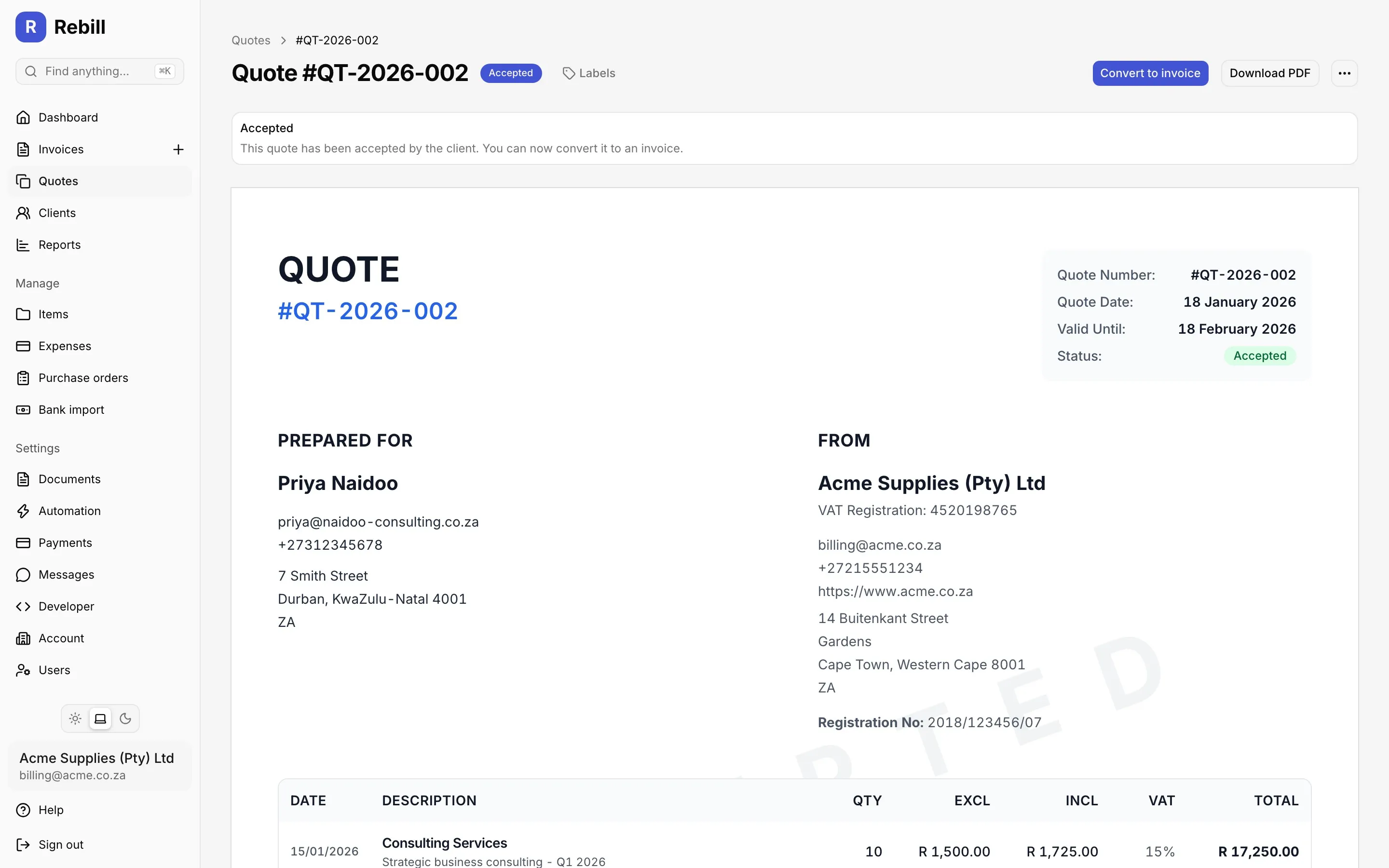
An accepted sample quote, ready to become an invoice. -
02 · Invoice it
Invoices and SARS tax invoices, without the admin.
Your branding, gapless numbering and the right VAT treatment once you register. Send by WhatsApp or email, once or on a schedule.
- VAT at 15% worked out for you
- Recurring invoices and automatic reminders
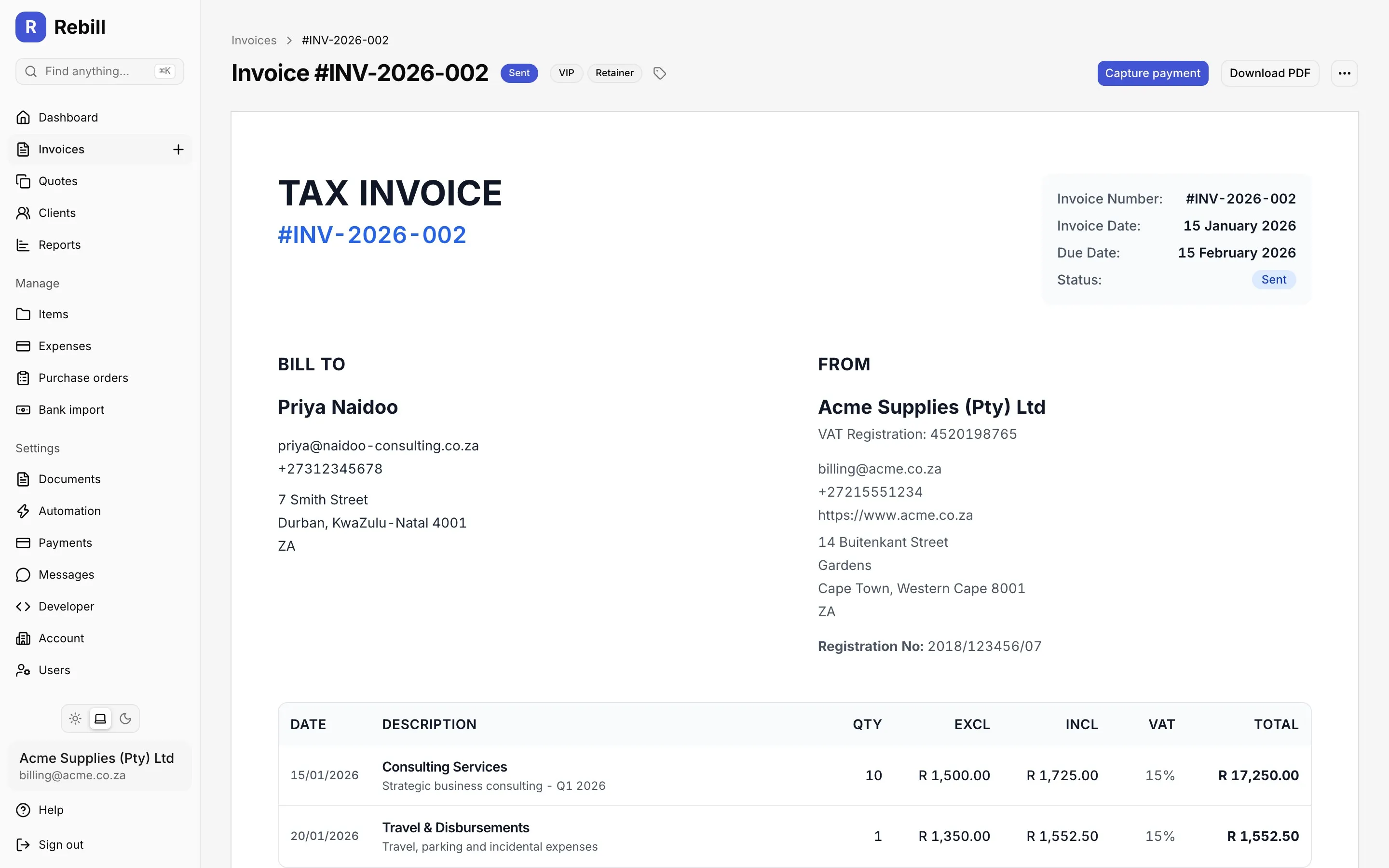
A sent sample tax invoice with gapless numbering and VAT. -
03 · Get paid
The payment lands. The invoice sorts itself out.
Clients pay by card through Paystack, Yoco, PayFast or iKhokha, or you record the EFT. Rebill matches the payment, handles partials and keeps the balance clear.
- Money settles in your own gateway account
- No transaction fees added by Rebill
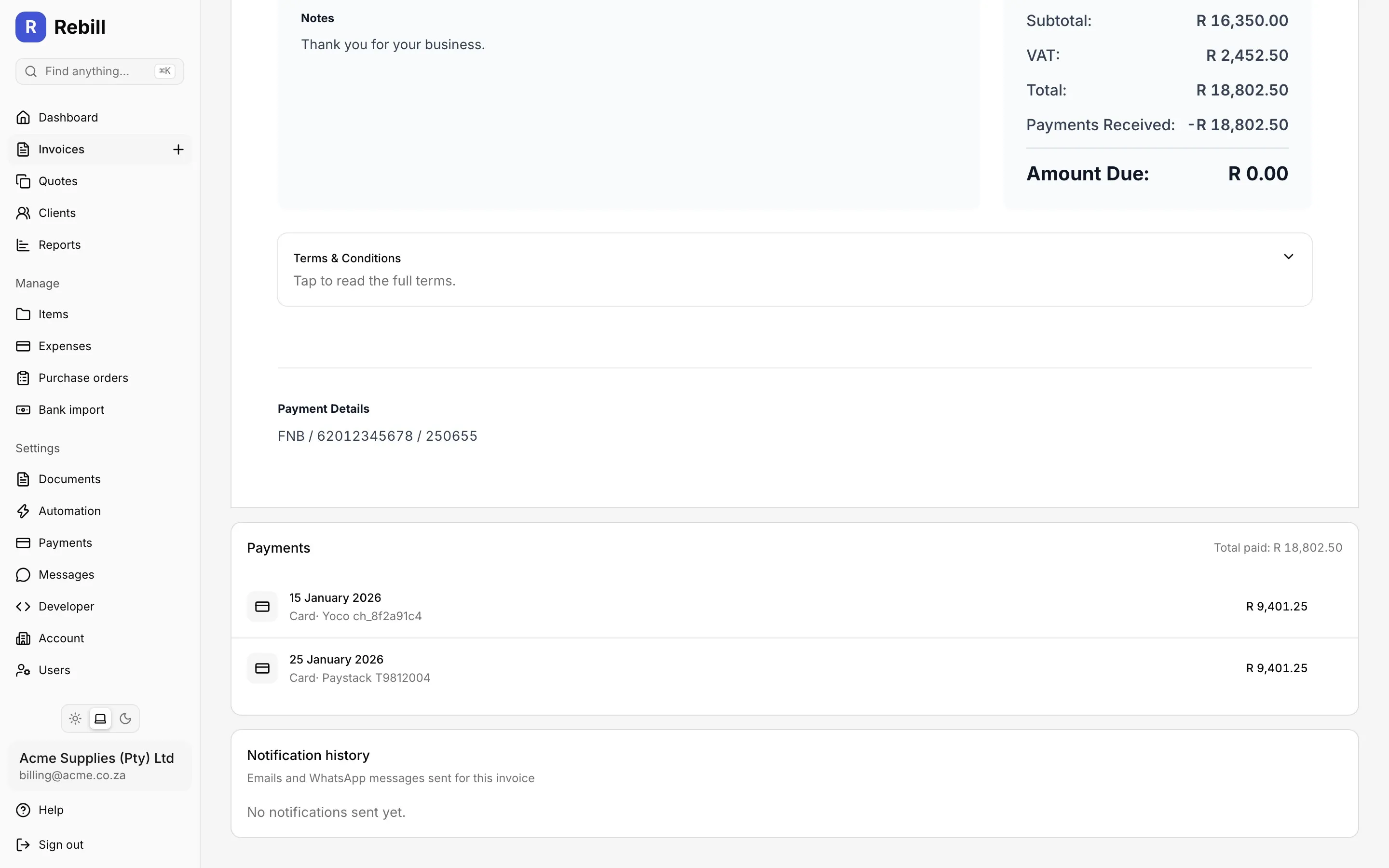
A sample payment matched to its invoice, with the balance in plain sight. -
04 · Know the numbers
See what came in, what is late and what is next.
Revenue, ageing, projected income, profit and loss, VAT201 figures and a tax set-aside estimate, from the invoices and expenses you already capture.
- Financial-year presets
- Clean exports for your accountant
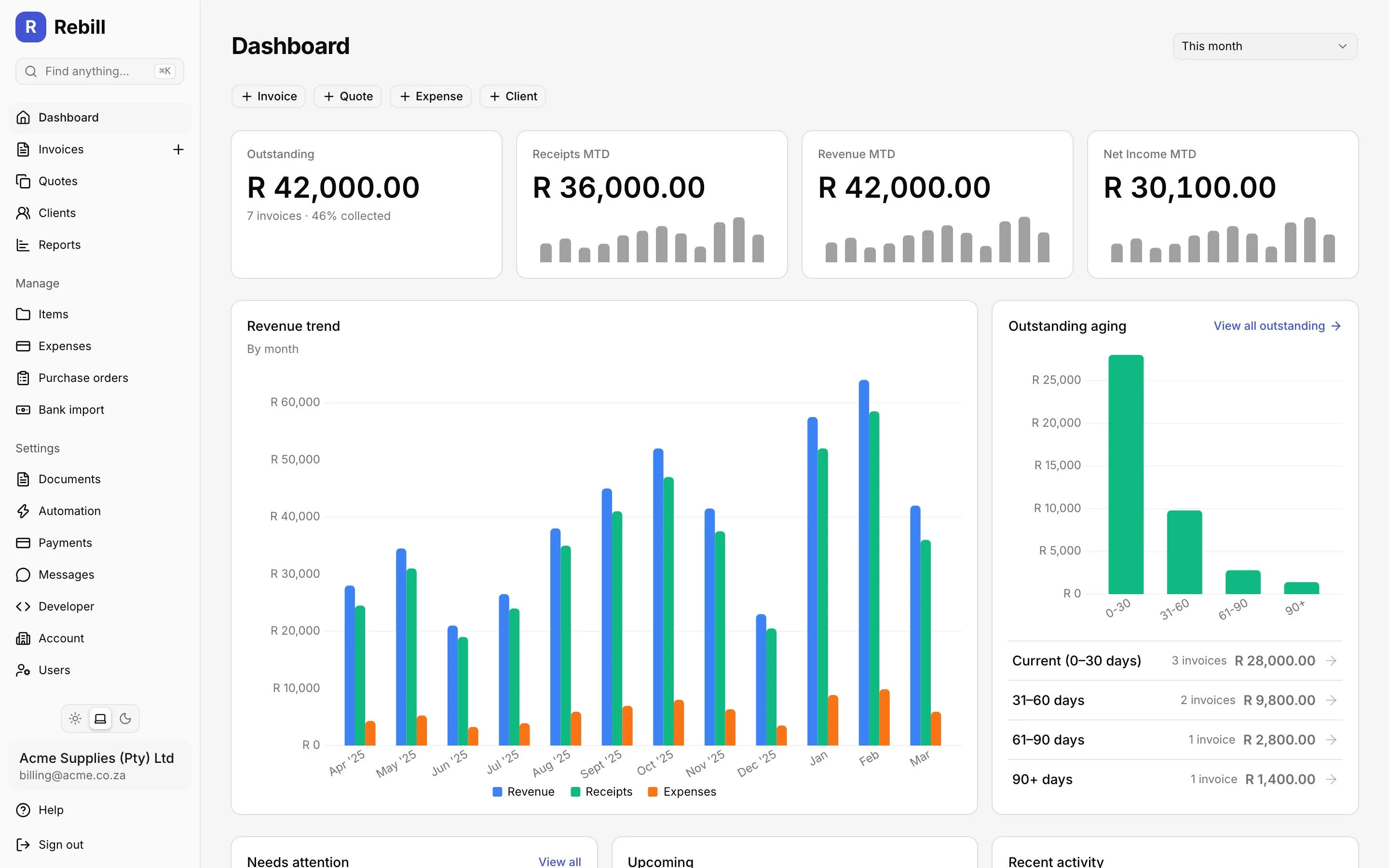
A sample dashboard: cash in, cash outstanding and the trend over time.
Who uses Rebill?
Freelancers
Designers, developers, photographers and writers doing project work. The free plan covers a light month, and quotes turn into invoices in one click.
Invoicing for freelancers →Small businesses
Trades, retailers and service businesses with a steady client list. Recurring billing, up to 5 users on Premium, and a clear view of who owes what.
Invoicing for small businesses →Consultants
Retainers and project fees for advisers and professionals. Monthly invoices on schedule, statements in the client portal and late fees that apply themselves.
Invoicing for consultants →What Rebill customers say
Rated 4.7 out of 5 11 reviews on Capterra (opens in a new tab) Showing 4 of 11 reviews


Rated 5 out of 5
"Amazing amazing amazing!! Top-notch service from the support team, best service experience I've received before."
Rated 5 out of 5
"I'm happy that I have found a perfect invoicing system for my business and the team is excellent, and the system itself is not too complicated, spent few hours studying it then you are good to go, and the invoices are simple, clean and very professional."
Rated 5 out of 5
"What I appreciate most is how simple it is to send invoices and keep track of payments. My clients can pay easily and I don't have to chase payments nearly as much as before."
Rated 5 out of 5
"The invoicing and recurring billing are very straightforward to set up, and payments are easy to track. I like having everything in one place instead of using multiple apps for my needs and Rebill has all of that."
Contents
01 / 08
What is Rebill?
Rebill is online invoicing software for South African freelancers, consultants and small businesses, built and operated by Tora Technologies (Pty) Ltd in Cape Town. It creates invoices, and SARS tax invoices once you are VAT registered, sends them by WhatsApp or email, and collects payment through Paystack, Yoco, PayFast or iKhokha into your own gateway account. Quotes, recurring billing, expenses, statements and VAT reports are in the same place.
It is not accounting software. Rebill replaces the invoice template, the chasing and the payment reconciliation. Your accountant still gets clean exports at year end.
Reviewed 20 October 2026 by Nico Huysamen, Founder & Director, Tora Technologies.
02 / 08
What does Rebill cost?
Rebill has two plans. Free costs R0 with no time limit and includes 10 invoices a month, 5 clients, 5 quotes a month, 4 catalogue items, 20 expenses a month, email delivery, PDF export, revenue reports and the client portal. Premium costs R99 a month and removes the invoice, client, quote and expense limits, includes up to 5 user accounts, and adds VAT, online payments, WhatsApp delivery with 20 credits a month, recurring billing and client items, automatic reminders, late fees, scheduling, multi-currency and API access. Rebill charges no transaction fees on payments.
10 invoices a month, 5 clients, 5 quotes a month, 4 catalogue items, 20 expenses a month, purchase orders, client portal, share on your own WhatsApp. No card to sign up.
Start free →Unlimited invoices, quotes, clients and expenses. VAT and tax invoices, Paystack, Yoco, PayFast and iKhokha, WhatsApp delivery with 20 credits a month then R0.30 each, recurring billing, reminders, late fees, scheduling, multi-currency, statements, VAT report, up to 5 users, API. Cancel any time.
Compare plans →Card and EFT fees are charged by your gateway, usually between 2% and 3.5%, and go to the gateway, not to Rebill. The full plan table is on the pricing page.
03 / 08
How does WhatsApp invoicing work?
The feature clients mention by name
On Premium you send the invoice on WhatsApp and Rebill delivers the invoice to the client's number from Rebill's own WhatsApp Business account, with the amount, the due date and a link to view and pay, and the PDF in the chat if you switch that on. Nothing is installed on the client's phone. Payment reminders can go the same way. Each message uses one credit: 20 come with Premium every month, more cost R0.30 each and never expire.
On the free plan you can still share any invoice or quote from your own WhatsApp with one tap.
WhatsApp invoicing in detail →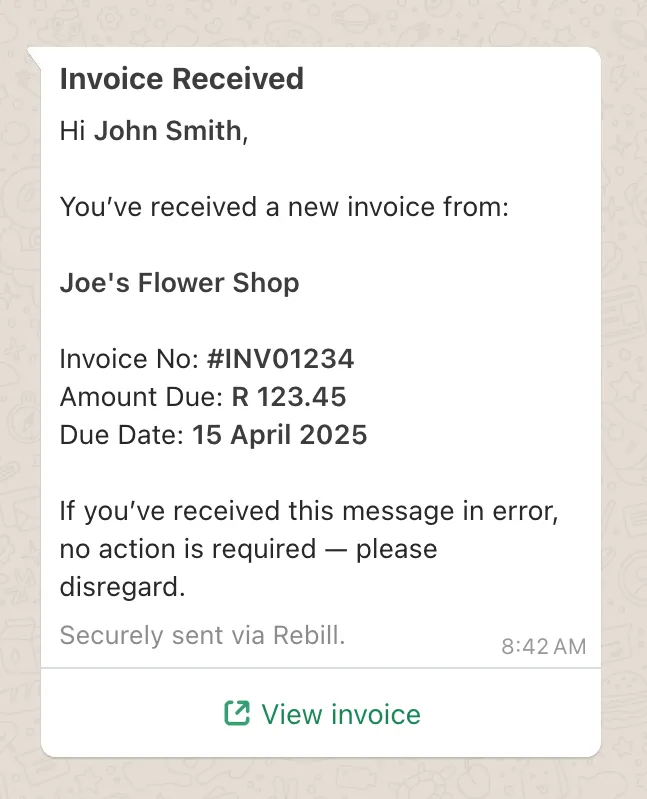
04 / 08
Do I need to be VAT registered to use Rebill?
No. Most Rebill users are not VAT registered. Leave the VAT number blank and every invoice is a standard invoice without VAT. If you register later, add your VAT number on Premium and every new invoice becomes a SARS tax invoice: the words Tax Invoice, both VAT numbers, VAT at 15% and the other fields section 20 of the Value-Added Tax Act 89 of 1991 requires, numbered without gaps.
For VAT vendors, Rebill also produces the VAT201 figures for a period, output VAT on sales less input VAT on deductible expenses, on an accrual or cash basis, and a tax set-aside report that estimates what to put away for SARS as an individual, company or small business corporation.
VAT and tax reports →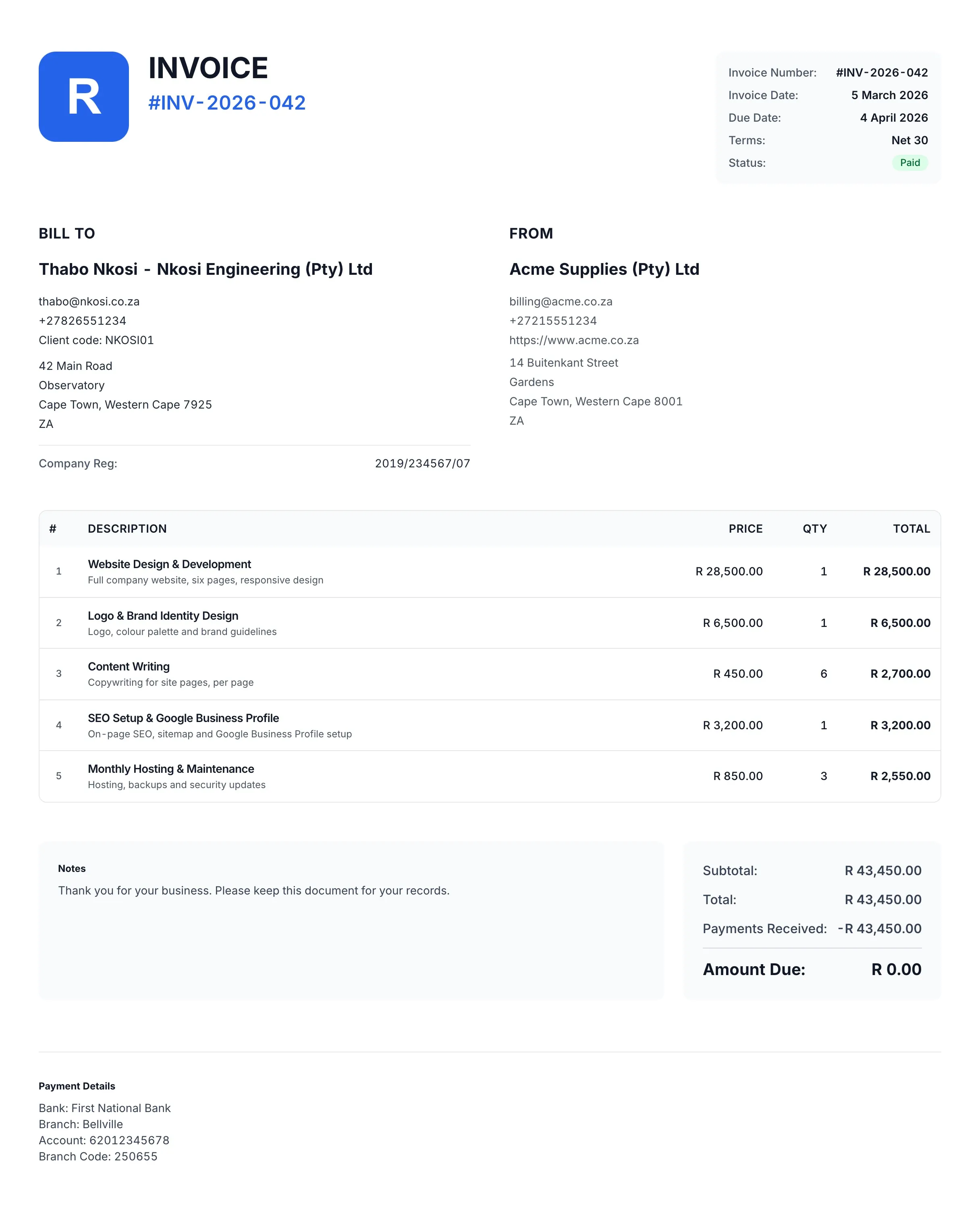
What a SARS tax invoice must show
Section 20 of the VAT Act sets the fields. Rebill fills every one of them in once your VAT number is on the account.
- The words Tax Invoice
- Shown prominently on the document.
- Your name, address and VAT number
- The supplier details as registered with SARS.
- Your client's name, address and VAT number
- Required on a full tax invoice, for supplies over R5,000. The VAT number only if the client is registered.
- A unique, sequential number
- Rebill numbers invoices without gaps or duplicates.
- The date of issue
- It decides which VAT period the supply falls in.
- What you supplied
- A description of the goods or services, with the quantity or volume.
- Value, VAT and total
- The value of the supply, the VAT charged at 15% and the total, or a total that includes VAT with the rate stated.
For supplies of R5,000 or less an abridged tax invoice may leave out the client's details, and below R50 no tax invoice is needed. SARS has also announced plans to move VAT invoicing to e-invoicing in phases, starting with larger businesses; the dates are not final, and Rebill will follow the published requirements. More detail in how to create a VAT invoice in South Africa.
05 / 08
What else does Rebill do?
Everything between the quote and the bank statement. Quotes with terms the client accepts online, recurring invoices on any schedule, client items that put every monthly service a client has on one invoice, bulk invoices from a CSV, purchase orders, expenses including recurring ones, client statements for any period, a payment ledger with bank statement import, and reports for revenue, ageing, VAT, tax set-aside, projected income and team performance. Each item below links to its page.
- Quotes
- Terms and conditions the client accepts online, files and links delivered with the quote, follow-up reminders, edit until accepted, convert to an invoice in one click.
- Recurring billing
- Weekly, monthly or any schedule. Rebill creates and sends each invoice and carries labels and terms across.
- Client items
- Give each client the services they pay for, monthly, yearly or once. On their billing day everything due goes on one invoice, prorated when they start mid-month. Premium.
- Bulk invoices and imports
- Upload a CSV and Rebill creates a draft invoice per client and emails the batch in one run. Import past invoices from Wave or any spreadsheet.
- Online payments
- Paystack, Yoco, PayFast or iKhokha on every invoice. Money settles in your own gateway account. Rebill adds no fee.
- Reminders and late fees
- Automatic reminders before and after the due date by email or WhatsApp. Optional late fees, fixed or percentage, applied on schedule.
- Client portal and statements
- A link where clients see every invoice, pay, and download a statement for any period with the balance brought forward.
- Payments and bank import
- Record EFTs, allocate one payment across invoices, import a CSV from your bank and match lines to invoices.
- Expenses and purchase orders
- Log expenses with VAT, set up recurring ones, raise purchase orders to suppliers and convert them to expenses when delivered.
- Reports
- Revenue and projected income, ageing, clients, expenses, profit and loss, VAT201 figures, tax set-aside, team win rates. Financial-year presets.
- Multi-currency
- Invoice in any ISO 4217 currency with separate totals per currency. Dates and tax labels follow the account country.
- Team, labels and API
- Extra users, quotes and invoices owned per person, internal labels for filtering, and a REST API for your own systems.
- Booklink
- Every confirmed booking in Booklink becomes a Rebill quote or invoice, with the deposit already recorded.
06 / 08
How does Rebill compare to Sage, Xero, QuickBooks and Zoho?
Sage, Xero and QuickBooks are full accounting packages with no free plan, and none of them publishes automatic WhatsApp invoice delivery. Zoho Invoice has a free plan but no South African payment gateway and only a manual WhatsApp share. Rebill is invoicing and payments only, free for 10 invoices a month, R99 for everything, with Paystack, Yoco, PayFast and iKhokha and WhatsApp built in.
| Question | Rebill | Sage | Xero | QuickBooks | Zoho Invoice |
|---|---|---|---|---|---|
| Monthly price | R0 or R99 | From R270/mo incl VAT | From R450/mo incl VAT | From R322/mo | R0, capped at 500 invoices a year |
| Free plan with no time limit | Yes, 10 invoices a month | No, 30-day trial | No, 30-day trial | No, 30-day trial | Yes, 500 invoices a year |
| WhatsApp delivery built in | Yes, sent automatically | Manual share only | Email and SMS only | Not mentioned | Manual share only |
| Paystack, Yoco, PayFast, iKhokha | All four | None of the four | Stripe, GoCardless, PayPal | None named for SA | None |
| Full double-entry accounting | No, exports to your accountant | Yes | Yes | Yes | No |
Competitor prices checked 20 October 2026 on each vendor's South African pricing page, with prices and sources on each comparison page: Sage, Xero, QuickBooks, Zoho Invoice.
07 / 08
Is my data safe under POPIA?
Yes. Client names, contact details and VAT numbers are encrypted with AES-256 before they are stored, each account with its own key, and everything travels over TLS. Card details never touch Rebill; they go to your PCI-DSS gateway. You are the responsible party under POPIA and Tora Technologies is the operator. You can delete a client, or your whole account, yourself.
The full model is on the security page. Rebill is operated by a South African company under South African law.
- Field-level encryption
- AES-256
- Encryption keys
- One per account, envelope encrypted
- In transit
- TLS 1.2 or higher
- Card data
- Never touches Rebill; PCI-DSS gateways
- Records kept
- 5 years
08 / 08
Who builds Rebill?
Rebill is built and operated by Tora Technologies (Pty) Ltd, an independent South African software company registered in Cape Town (CIPC 2025/583656/07) and founded by Nico Huysamen. Tora Technologies builds and runs its software itself rather than outsourcing the important parts, which keeps it close to its customers and lets it act on real needs quickly. Tora Technologies also builds Booklink, the booking system Rebill connects to, and Our Big Yes.
Support is answered by the people who write the software. Email [email protected] or read the help centre.
- Legal name
- Tora Technologies (Pty) Ltd
- Registration
- 2025/583656/07
- Based in
- Cape Town, South Africa
- Products
- Rebill, Booklink, Our Big Yes
- Support
- [email protected]
More
Other questions
I need one invoice right now. Do I have to sign up?
No. The free invoice generator builds a PDF in your browser with no account, no watermark, just a small Rebill line in the footer. Sign up later and that invoice and client come with you.
Do my clients need an app or an account?
No. They open a link, see the invoice, and pay by card or EFT. The client portal is optional and needs no password.
Can I move from Sage, Xero or a spreadsheet?
Import your clients from a CSV and set your next invoice number so the sequence continues. Past invoices can come too: import them from a Wave export or any spreadsheet, with their numbers, dates and payments, and nothing is sent to your clients.
Free tools, no account
All free tools →Build an invoice with your details, your client, line items and banking details for EFT, then download the PDF.
Open the tool →Put together an itemised quote with a valid until date and your terms, then download the PDF to send to your client.
Open the tool →List the opening balance, invoices, payments and credit notes for a period and get the running balance and ageing.
Open the tool →Mobile app
Invoice from the job site.
The Rebill app for Android uses the same account as the web app. Make the invoice before you leave the job, and see the moment it is paid.
- Create and send invoices and quotes
- Record payments, expenses and credit notes
- An alert the moment a client pays or accepts a quote
 iPhone app coming soon

Send your next invoice in five minutes.
Free plan. No card. A tax invoice from the first one.
No card required · Cancel anytime